What's new and why it matters
 Fayaz Rafeeq, Dynamics 365 ERP Consultant · Published Jul 7, 2025
Normal retail discounts:
You set up a discount, pick the items, and link it to a price group. That discount is then available in any store or channel connected to that price group. It's quick and works well for basic promotions.
Unified Pricing Management (UPM):
UPM, on the other hand, is like upgrading from a flip phone to a smartphone for your pricing. It lets you control prices and discounts using any combination of product, customer, or order details across all your sales channels, in real time. This way you can build smarter, more targeted offers that fit your business perfectly.
Real-world example: Contoso Entertainment System
Contoso can:
With normal discounts, these scenarios would be difficult or require lots of manual workarounds:
| Feature | Normal retail discounts | Unified Pricing Management (UPM) |
|---|---|---|
| How you target discounts | By price group (channel/customer and item/category) | By product, customer, order, channel, etc. (attributes) |
| Where you manage it | Retail/Commerce modules | Centralized Pricing Management workspace |
| Types of offers | Simple, mix & match, threshold, etc. | Free item, discount claim, funds |
| Flexibility | Good for simple cases | Great for complex, modern scenarios |
Now, let's take a look at how the UPM has to provide us with its features and some noticeable differences between the configurations and setups.
We are only focusing on the discount/promotion side of the UPM specially on commerce.
If a commerce user had to create a simple discount in normal retail discounts, the user creates the discount, adds the items, and attach it to a price group so that it applies this specific discount to a specific store which has the same price group attached. It picks the price and fires the promotion against the specific price group and so on.
But when it comes to the UPM, the scenario changes, we specify or create the promotion to certain channels, customer groups, B2B, with the combination of price attributes groups, price component codes, price groups. Before we jump to that we should understand some basic concept that we need to setup the UPM based discount.
Let's start with the basics on the prerequisites and the first few noticeable changes that we need before configuring a discount in UPM.
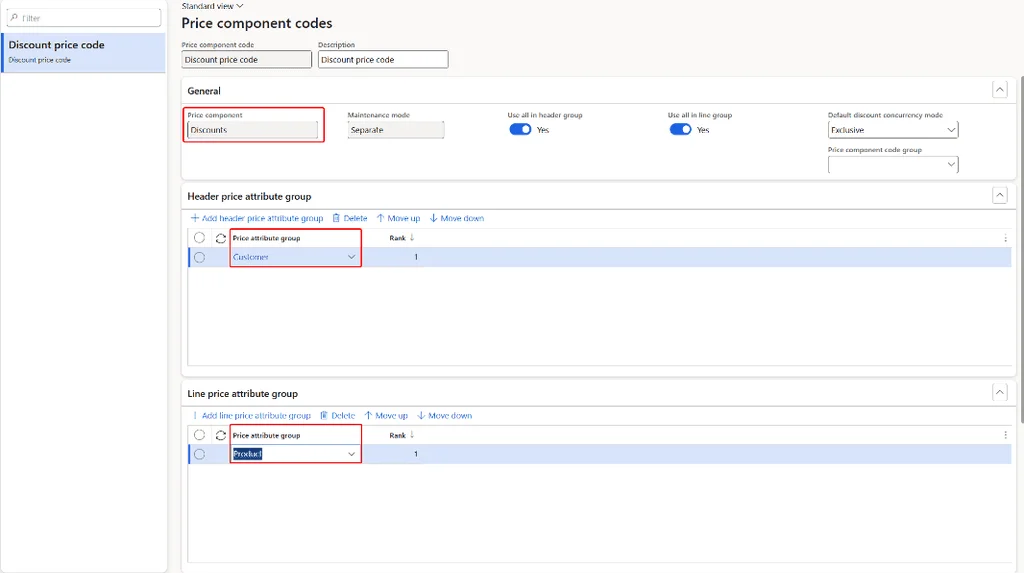
The price components are the building blocks for us to define our pricing structure. The price component code will be used to gather the header and the line price attribute groups and next to be able to allocate it within a discount or base price.
Below is a sample discount price component code created with the sample header and line attribute group.
Price attributes allow us to define custom information about products, customer and orders as the basis for pricing strategy. You can define literally any custom attribute or factor about your product, customer and order as an attribute and use it to define prices. While creating the attribute group you can define if the sales order matching scope as header or lines based on your need.
Price attributes provide us with a flexible way to define your factors for pricing. Price attributes can be used across all above 5 price components. Price attributes can be created for:
Above is a sample of created with the sample header and line attributes attached to a Discount price component code.
The price group logic remains almost the same in the unified approach, however the UPM Price group acts as bridge between the price attributes and price tree, hence it opens the possibility to implement price discrimination strategies and grouping of prices in much for flexible way.
For example, different prices can be charged for the same product, depending on the time of purchase, the location of the customer, or the demand conditions.
In general, the unified pricing helps to integrates multiple pricing attributes, such as channels, affiliations, loyalty programs, and catalogues into logical price groups.
As a quick summary on the prerequisites, the price structure, price components and price attributes are the key elements to be configured before creating a discount in UPM enabled environment.
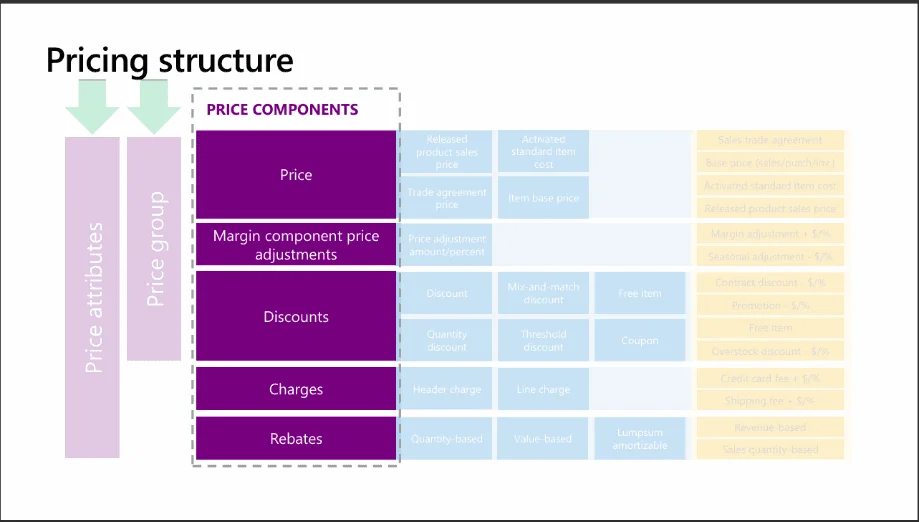
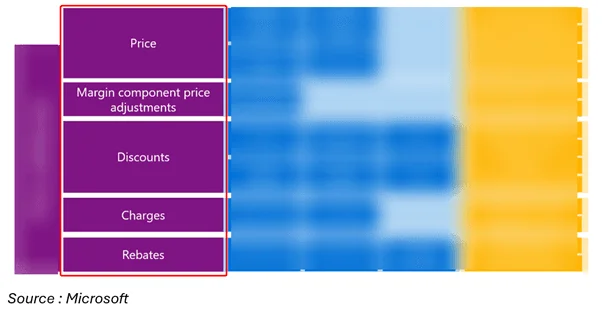
A pricing structure or price tree defines how prices are determined, displayed, and adjusted based on various factors. The sequence in which the price components are arranged is called a pricing structure or price tree for a legal entity.
Source: Microsoft
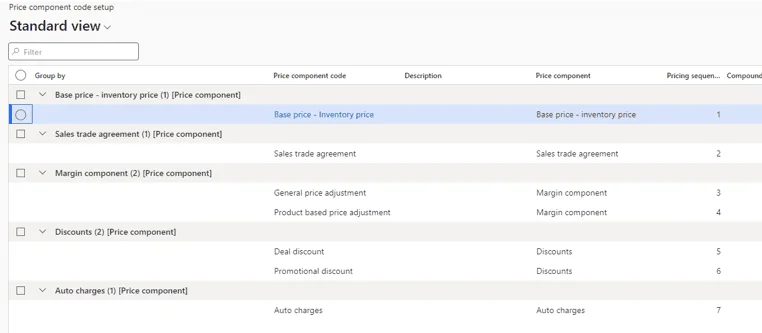
Below is a sample price tree which the base inventory price is the first sequence, and adjusted by sales trade agreements, price adjustment, discounts etc.
Now let's explore what's changed in the way of configuring the discount in the new UPM enabled environment.
At a glance, the navigation view has changed, as in if you want to view the full discounts setups, you may have to navigate to the Pricing management > During sales pricing > Discounts.
You can access from the Retail and Commerce modules too, but you will miss out the new "Free item" promotion. Yes, you get a new type of promotion and other features too with the UPM, we will talk about it after the navigation topic is fully covered.
Along with the discounts the During sales pricing tab contains:
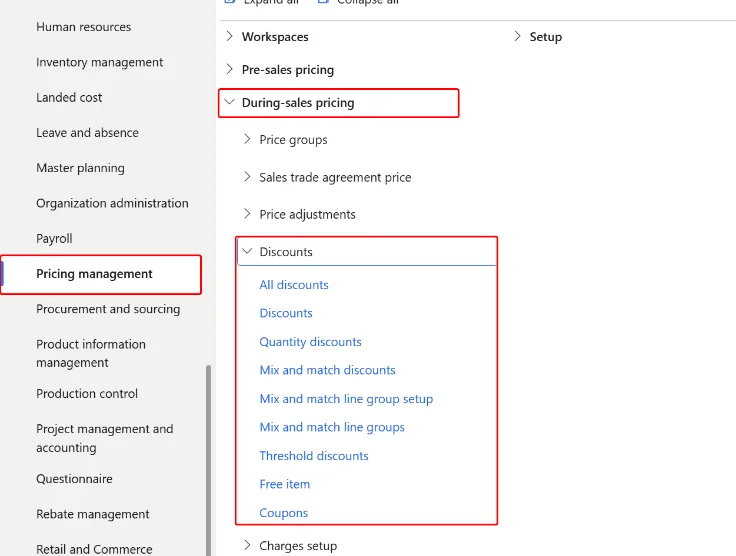
As you are most probably aware of what price adjustment, price group, charges, and price simulators are, we will talk about the new added feature "Discount claim".
Discount claim is a new feature in UPM that makes it easy to track and manage discounts that are meant to be claimed back whether from a vendor, a partner, or within your own organization.
This is especially valuable for B2B scenarios electronic retailers, promotions funded by suppliers, or internal rebate programs making the whole process transparent and easy to audit.
And as the name states, it make the discount claimable. For example, if the discount is sponsored by a vendor and can therefore be charged back to that vendor.
You can enable the discount claim feature by enabling the toggle in discount header.
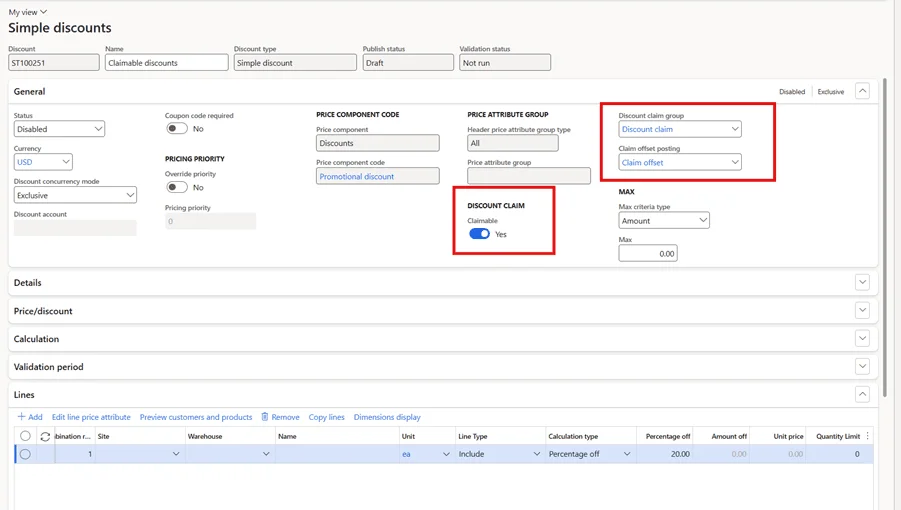
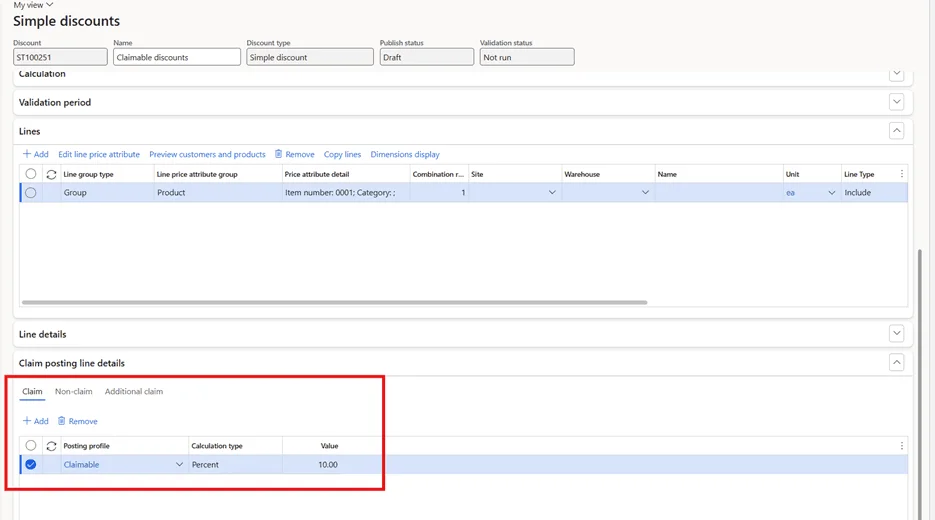
Configure discount claim posting: Initially, set up the discount claim posting profile to handle discount accrual posting and define the discount claim journal within pricing management parameters.
Setup claimable discounts: When configuring promotions or discounts, specify if they are claimable or non-claimable.
If you set to claimable, you get an option to capture claim profile the accrual discount claims: Discounts applied on sales orders
Normal retail:
"10% off all TVs in Store A and Store B."
UPM:
"10% off all Techware TVs, but only for loyalty members shopping online, and only if they choose air delivery. Plus, give them a free HDMI cable!"
With UPM, the more you play with mapping your key product, customer, and order attributes the smarter and more flexible your pricing and promotions become.
However, couple of features that we are missing out with UPM at least as of now.
Unified Pricing Management is the modern way to handle pricing and discounts in Dynamics 365. It's flexible, powerful, and designed for today's omni-channel world. If you want to run smarter promotions and keep your pricing consistent everywhere, UPM is the way to go.
Stay tuned for part 2, where we'll cover discount configuration changes, including concurrency mode, header and line attributes, free item discounts, funds management, and more.
 Insight Dynamics